The last time I flew, I spent a minute standing at one of those automated passport gates - the glass booth where you lay your passport on the reader, look up at the camera, and wait for the doors to decide they like you. It takes a moment. And in that moment I found myself thinking about what the machine was actually doing. It wasn’t just reading the printed page. It was also talking to the little chip tucked inside the cover of my passport.
I have spent years reading NFC chips for a living. I knew that chip was in there. I had just never pointed my own app at it. Standing in that gate, it genuinely bothered me that a border kiosk could read my passport and NFC.cool couldn’t.
That is the itch NFC.cool exists to scratch. My goal for it has always been simple and a little stubborn: be the best NFC reader you can put on a phone, and support everything NFC can actually do - without turning it into a tool you need an engineering degree to hold. A passport chip is about as “everything NFC can do” as it gets. So I built it in.
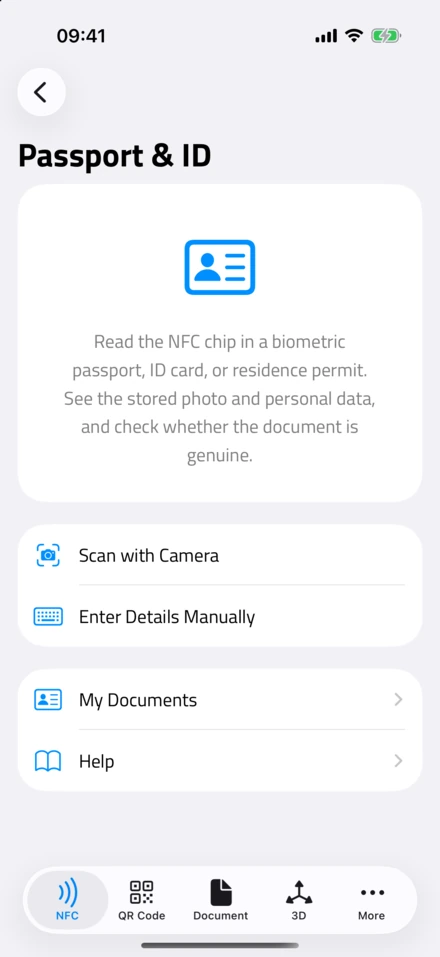
NFC.cool Tools now reads the chip inside a biometric passport, an ID card, or a residence permit, on both iPhone and Android. It shows you the photo and the personal details stored on the chip, and it tells you whether the document looks genuine. Here is how it works, and where the honest edges of it are.
The chip won’t talk until you prove you’re holding the document
This is the part that surprises people: you can’t just wave your phone over a passport and read it. The chip is deliberately locked. It won’t say a single word until you hand it a key, and that key is printed right on your own document.
I think that is a lovely piece of design. It means nobody can quietly read your passport while it sits in your pocket or your bag. The only way in is to already have the document open in your hand, because the key is built from what is printed on it: the document number, your date of birth, and the expiry date.
So the app asks for exactly those three things first, in one of two ways. You can point your camera at the machine-readable zone - that band of chunky <<< characters along the bottom of your passport photo page, or the back of an ID card - and NFC.cool reads it optically, the same way the airport gate does. Or, if the document is worn or the light is bad, you type the three values in by hand. Either way, once the app has the key, it asks you to hold the top of your phone against the document, and the real chip read begins. If you have ever wondered how NFC actually works on an iPhone, this is the same close-range handshake, just with a much fussier chip on the other end.
What comes off the chip
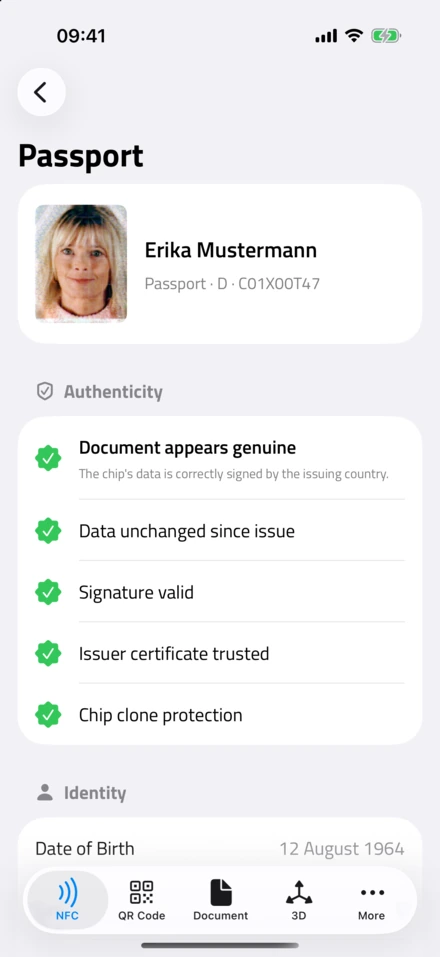
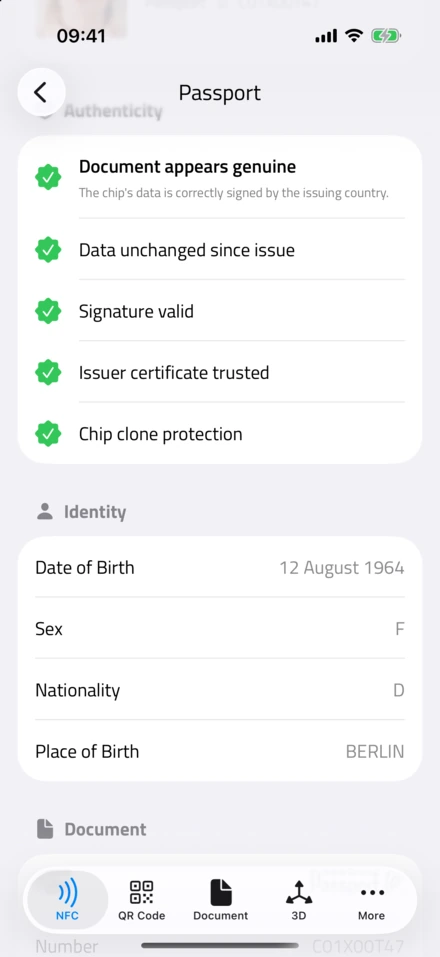
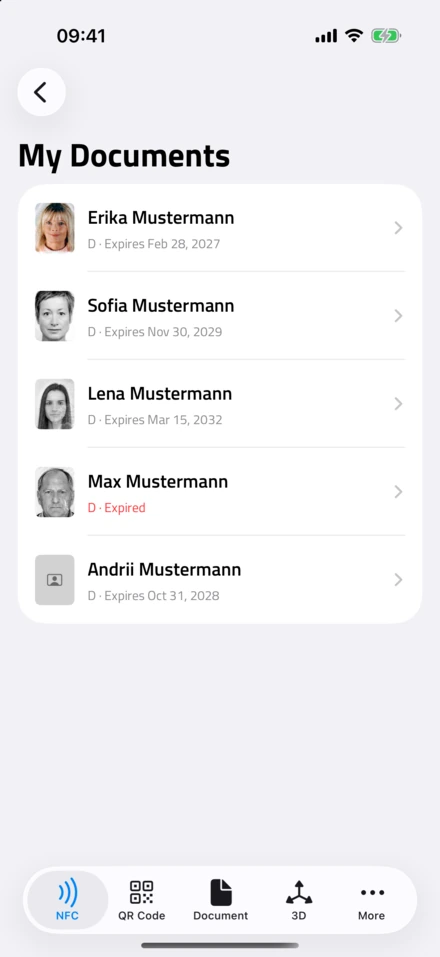
A few seconds later you are looking at what the chip has been carrying this whole time: the photo of you that the issuing authority stored, your name, your nationality, the document number, your date of birth and expiry, and on some documents a little more - place of birth, the issuing authority, the date it was issued. It is the same data the officer’s booth pulls, sitting in your hand instead.
Every document you read is saved to a small wallet in the app, called My Documents, so you can look back at it later. That wallet lives on your device, and on iPhone it syncs through your own iCloud. It does not come to me, or to any server of mine. With something this personal, that’s not a detail I’d bury.
Is it genuine?
The part I am most pleased with is the authenticity check. A modern passport chip is not just a memory card. The issuing country signs its contents, a bit like a wax seal pressed into the data. NFC.cool checks that seal: that nothing on the chip has been altered since it was issued, that the signature is mathematically valid, and that it traces back to a real issuing authority the app recognizes. Better chips can also prove they are the original silicon rather than a copy, and the app checks that too when the chip supports it.
Here is the promise I made myself about the wording, though. The app will never call your passport “fake.” If every check passes, it says the document appears genuine. If something does not line up - or, far more often, if it simply cannot confirm the issuer because that country is not in the list the app carries - it says it could not verify, and it stops there. “I couldn’t check this” and “this is a forgery” are very different sentences, and I am not willing to blur them on something as serious as your ID.
The honest limits
A few straight answers, because this is the kind of feature where hand-waving would be a disservice.
It works on a lot of documents, but I can’t promise it works on every single one. I have tested it across a pile of passports and cards from different countries and most read cleanly, but the world’s documents are not perfectly uniform, and yours might be the odd one out. If one refuses, it is usually the document, not you.
It reads what it is allowed to read, and no more. Some chips also store fingerprints or iris data, and those sit behind keys that only government inspection systems hold - not something a consumer app is given, and not something I would want it to have. NFC.cool never touches them. It reads the face photo and the printed-style details, which is exactly the part meant to be readable by the person holding the document.
And it needs a phone with NFC, held still against the document while it reads. The chip is small and the connection is delicate, so a slipped phone means starting the read again. Keep the document flat against the top of the phone until it finishes.
I still think about that airport gate. All the security theater of modern travel, and at the center of it is a tiny NFC chip doing a careful little handshake - the same kind of handshake I have spent years reading and writing tags with. Now the reader in your pocket can do it too.
If you want to see what your own passport has been quietly carrying, the Passport & ID reader is in NFC.cool Tools on iPhone and Android, right next to everything else I have built for NFC. Open your passport, hold it to your phone, and meet the version of you that has been living on the chip.