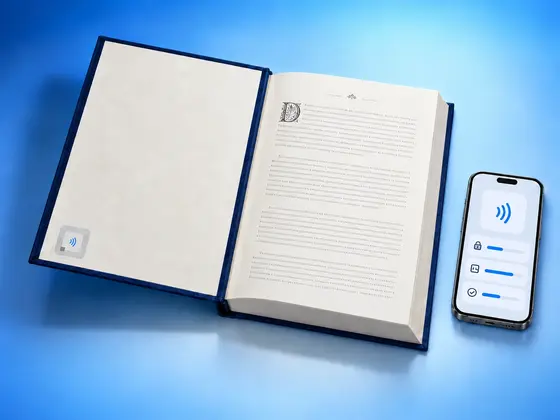
I had an ICODE 3 tag on my desk, my iPhone on top of it, and the app happily reading everything the chip had to say: its ID, its memory, its tap counter, NXP’s signature proving it was genuine. Then I asked it to change one thing, the counter, and the app told me the tag had moved away.
It hadn’t moved. I tried again. Same message. I tried setting a password instead. Same message.
I’ll come back to what was going on, because it’s the most interesting bug I’ve chased this year. But first, why I was poking at an ICODE tag at all.
I want NFC.cool to be the most capable NFC app you can put on a phone. This summer that meant NTAG 424 DNA, the tags brands use to prove a product is genuine. After that, the biggest family of chips the app still couldn’t really talk to was NXP’s ICODE. With NFC.cool Tools 7.1.0, it can.
ICODE, the tags you’ve held without noticing
If you’ve borrowed a book from a library in the last twenty years, there’s a good chance you’ve held an ICODE tag. It’s the flat label with a coiled antenna stuck inside the cover. The same chips sit in shop anti-theft labels, laundry tags and product labels.
Technically they’re ISO 15693 chips, which NFC calls Type 5. The NFC stickers most people buy, like the NTAG215, are a different standard. I think of it like two radio stations on the same dial: your phone can tune into both, but they don’t speak the same language once you’re connected.
The reason libraries and shops pick ICODE is range. A big antenna at a library gate or a self-checkout desk can read these from further away than a typical NFC sticker. With a phone you still hold it close, because a phone’s antenna is tiny, but the chip was built for those gates.
Reading the link or text stored on an ICODE tag was never the hard part. The interesting stuff lives underneath: passwords, a counter, the anti-theft flag, a privacy mode. That part of the chip was a closed box in NFC.cool until now.
What NFC.cool does with an ICODE 3
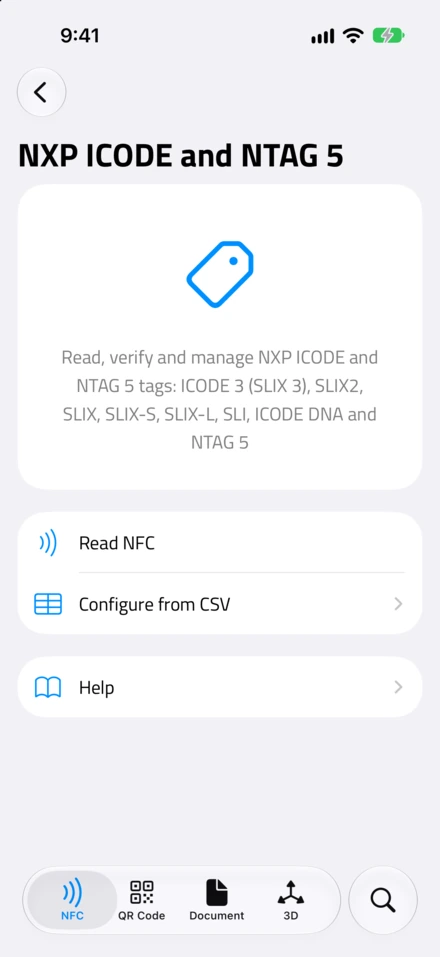
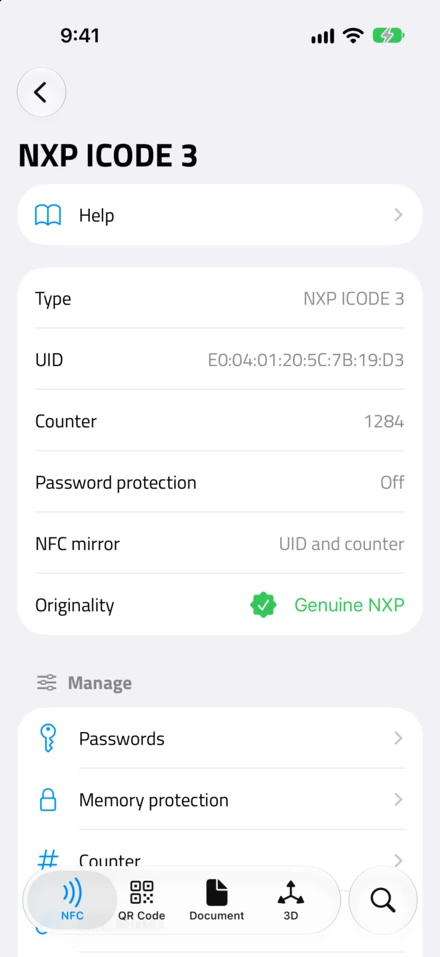
ICODE 3 is NXP’s newest chip in the family and the successor to ICODE SLIX2. You’ll often see it sold as “SLIX 3” online. NXP has no chip by that name, so if a listing says SLIX 3, it’s an ICODE 3.
Tap one with NFC.cool and you get the full picture: which chip it is, its memory, its counter, and whether it’s a Genuine NXP chip. NXP signs every chip’s ID at the factory, and the app checks that signature, so a copy that reuses the ID can’t fake it.
From there you can change almost everything the chip offers:
Tap counter. ICODE 3 can count every single read on its own. Turn on the NFC mirror and the chip writes its ID and the current count into the stored link, so every tap opens a slightly different URL a website can count. If you’ve read about the NFC Tap Counter, it’s the same idea on a different chip.
Passwords. ICODE 3 has six of them, one each for reading, writing, privacy, destroy, anti-theft settings and configuration. Every tag ships with the same factory values, so a protection only means something once you set your own. On iPhone, NFC.cool keeps your passwords in your iCloud Keychain, per tag.
Memory protection. You can split the memory into two parts and protect each one separately, for example keeping a public link readable while hiding the data stored after it.
Anti-theft and library settings. The EAS flag is what makes a shop or library gate beep. The AFI byte is what libraries use to mark a book as checked out. Both can be changed, and locked.
Privacy mode. The tag hides its ID and data until someone presents the privacy password.
Tamper detection on the SL2S3003TT version, which has a wire you can run across a bottle cap or a box seal. The app shows whether the seal was ever broken.
Your own signature. A brand can replace NXP’s signature with its own and lock it.
Destroy. It switches the chip off for good, for privacy at the end of a product’s life.
Several of these settings are permanent, and a few can make a tag unreachable from a phone. So for anything you can’t undo, NFC.cool asks you to type the last four characters of the tag’s ID first. It also refuses to change a tag other than the one you started with. I’d still try anything new on a spare tag first.
One small thing I fixed along the way: you can now format a blank ICODE tag as an NFC tag from the app, so it’s ready for a link or text.
The rest of the family
The app identifies which chip you’re holding and only offers what that chip can actually do. An older SLIX shows you fewer options than an ICODE 3, simply because the chip has fewer features.
SLIX, SLIX-S, SLIX-L, SLIX2 and the older SLI chips are the workhorses you’ll find in most libraries. SLIX2 has the counter and the memory protection. SLIX-S protects its memory page by page and supports 64-bit passwords, where every protected access needs both the read and the write password.
ICODE DNA is the security sibling. It holds secret AES keys that never leave the chip. Enter the key in NFC.cool and the app challenges the chip to prove it has it. A copy fails even when its ID and memory match perfectly.
NTAG 5 is the one I’m most excited about as a tinkerer. It’s an NFC chip meant to sit on a circuit board. The switch drives pins directly, and the link and boost talk to a microcontroller over I2C. They can power a small circuit just from your phone’s field, signal events on a pin, and share 256 bytes of memory with the board. NFC.cool reads and changes those settings, and on the NTP5332 and NTA5332 it can even talk to sensors wired to the chip, right from your phone.
You’ll find all of it in the NFC tools, under NXP ICODE and NTAG 5, right next to NTAG 424 DNA. Or just scan an ICODE tag and the app opens its details on its own.
The bug iOS didn’t want me to fix
Back to my desk and the tag that “moved away”.
ISO 15693 gives a phone two ways to talk to a tag. It can write the tag’s ID on every single message, like putting a name on an envelope, so only that tag answers. Or it can first select the tag, like turning to face one person in a room, and then just talk.
The envelope way is the cleaner one, so NFC.cool tries it first. To check whether it works, the app sent a quick test message with an ID on it. The tag answered, so the app concluded that addressed messages work, and went ahead.
Here’s what I didn’t know. iOS splits these commands into two groups. The standard ones every ISO 15693 chip understands, and NXP’s own commands, the ones for passwords, the counter and the configuration. When an addressed message carries one of NXP’s own commands, iOS refuses to send it. It never leaves the phone. It quietly returns an “invalid parameter” error, and that error looked to my code exactly like a tag that had slipped away.
My test message was a standard command, so it sailed through and told me everything was fine. Every real change used an NXP command, so every real change failed.
The fix was almost embarrassingly small once I understood it. The test now uses one of NXP’s own commands, a harmless one that just asks the chip for a random number. If iOS refuses it, the app switches to selecting the tag instead. I put the ICODE 3 back under my iPhone, tapped Set counter, and the number on the tag changed. I’ve rarely been that happy to see a counter move.
Where it works
On iPhone, all of this works with the NFC reader built into the phone. On iPad and Mac, which have no NFC chip, it works through an external USB NFC reader. The reader has to pass ICODE commands straight through to the tag. If yours does, the app reads and manages ICODE tags exactly as it does on an iPhone, and the bug from the last section doesn’t exist there at all. A reader that can’t pass them through still lets you read the tag’s memory.
Android is next. I’m bringing the same ICODE support to the Android app, with everything in this post: the SLIX family, ICODE DNA, NTAG 5 and every setting above. Android doesn’t put the wall from the last section between an app and the tag, so that bug won’t exist there either. I’ll update this post when it lands.
If you’ve got a drawer of library-style tags you could never do much with, or an NTAG 5 board waiting for a project, update to 7.1.0 and tap one. NFC.cool Tools is on the App Store, and on Google Play for Android, where ICODE will arrive as a regular update.