A while back I kept reading the same claim in passing: luxury brands are putting NFC chips in their products so you can tap a bag or a pair of sneakers with your phone and know it’s the real thing, not a counterfeit. Every article said the same shiny sentence and none of them said how. What actually stops a counterfeiter from copying the chip along with the handbag?
So I did the thing I always do when I’m curious about a tag. I went on AliExpress, found a listing for “NTAG 424 DNA” tags, ordered a small batch, and waited for the envelope to show up. A few euros, a couple of weeks, and I had the same silicon those brand-protection systems are built on sitting on my desk. Then I tapped one to see what it does.
What an NTAG 424 DNA tag actually is
On the outside it’s an ordinary NFC tag. You couldn’t pick it out of a pile of cheap ones, and any phone reads it without complaint. If you’ve read my guide to NFC tag types, it slots in as one more Type 4 tag your iPhone is happy to read.
The “DNA” part is what’s different. Inside, the chip holds a few AES-128 keys and a little cryptographic engine, and it can do something no plain NTAG215 or sticker from a multipack can do: it can sign every single tap. That signature is the whole ballgame. It’s the difference between a tag that says “here’s a link” and a tag that says “here’s a link, and here’s cryptographic proof that I, this specific genuine chip, am the one serving it, right now.”
That’s what luxury brands are actually paying for - not the link, the proof that a genuine chip is the one serving it.
How SUN and SDM work: a link that rewrites itself on every tap
Here’s the moment it clicked for me. When I looked at what the tag was actually sending, I realized I’d already built most of the machinery to understand it.
Earlier this year I shipped an NFC Tap Counter feature: a tag that counts how many times it’s been read and puts that number in the URL, so a link can know it’s the 47th time someone scanned it. An NTAG 424 DNA tag is that same idea, with an encryption layer wrapped around it that makes it impossible to fake.
The mechanism is called SUN (Secure Unique NFC), or SDM (Secure Dynamic Messaging) if you’re reading NXP’s datasheet. You store a normal link on the tag, something like https://example.com. But you tell the chip to rewrite parts of that link on the fly every time it’s tapped. So what your phone actually receives is closer to:
https://example.com/?picc_data=A1B2...&cmac=9F3C...
Those two values are not decoration. picc_data is an encrypted copy of the tag’s real ID plus a tap counter, scrambled with a key that never leaves the chip. cmac is a cryptographic signature over that data. Both change on every tap. Tap the same tag twice and you get two completely different URLs, each one signed fresh by the chip.
I think of a plain NFC tag as a printed sign in a shop window. Anyone can photograph it and print an identical copy. A SUN tag is more like a security guard who hands you a new, individually numbered and stamped receipt every time you walk in. Copying yesterday’s receipt does you no good, because today’s number is different and only the guard’s stamp is real.
Why a cloned NTAG 424 DNA tag gets caught
This is the part that answers my original question. A counterfeiter can absolutely clone the contents of a tag. They can read the URL, copy it byte for byte, and program it onto a blank chip. That has always been true.
What they can’t do is produce the next valid signature. The signing key lives inside the genuine chip and never comes out, not even during a tap. That means a tap is only worth anything to something that actually holds the key. In a real brand-protection setup the tag’s link points at a server the maker runs, and that server is what decrypts each tap, recomputes the signature to confirm the key matches, and keeps track of the counter as it climbs.
That last part is what catches a clone. The only URL a counterfeiter can put on a fake is one they captured from a genuine tap, frozen with the counter that tap happened to carry. Replay it and the server is looking at a number it has already seen, and a real chip’s counter only ever moves forward, so a repeat or a step backward gives the replay away. To send a fresh, higher counter with a signature that still checks out, they’d need the key, and to get the key they’d need to break AES or physically decap the chip. Neither is happening for a fake handbag.
That’s the honest version of the marketing sentence. The chip doesn’t make the product impossible to copy. It makes the proof of authenticity impossible to copy, and it moves that proof onto something the counterfeiter can’t reproduce.
What is inside the chip
Everything NFC.cool does with these tags makes more sense once you have the chip’s layout in your head, so here is the map I had to build before I could write a line of code.
An NTAG 424 DNA is an NFC Forum Type 4 tag with 416 bytes of memory, organised as one application holding three fixed files. You can’t create or delete files the way you can on a MIFARE DESFire. These three are all you get:
| File | Size | What it holds |
|---|---|---|
| File 01 | 32 bytes | The capability container that tells a phone where the NDEF data lives |
| File 02 | 256 bytes | The NDEF message, usually your link. SUN mirrors its live values into this file on every read |
| File 03 | 128 bytes | A proprietary file the chip can keep encrypted. NFC.cool uses it as the vault, more on that below |
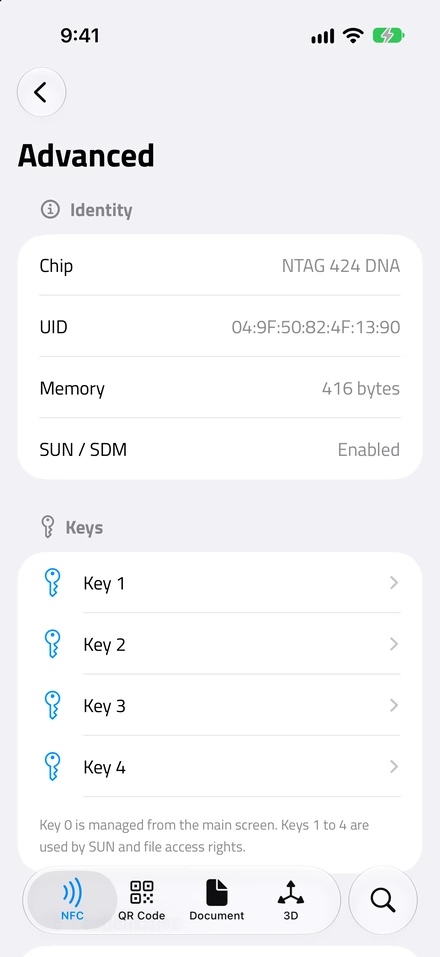
Next to the files sit five AES-128 keys, numbered Key 0 to Key 4. Key 0 is the application master key: it’s what you authenticate with to change the link, switch SUN on, change any other key, or touch the chip’s configuration. Keys 1 to 4 do nothing on their own. They only matter once a file’s access rights or the SUN setup points at them. On a fresh tag all five keys are sixteen zero bytes and the NDEF file is writable by anyone, which is why a brand-new tag takes a plain link without any ceremony.
Every command that changes something runs inside an authenticated session: phone and chip do a mutual challenge-response with one of those keys, derive session keys from it, and from then on every command carries a MAC or is fully encrypted. That’s the secure messaging the rest of this post keeps referring to. NFC.cool implements it in full, on iPhone and on Android, and every write described below goes through it.
What a tap shows you
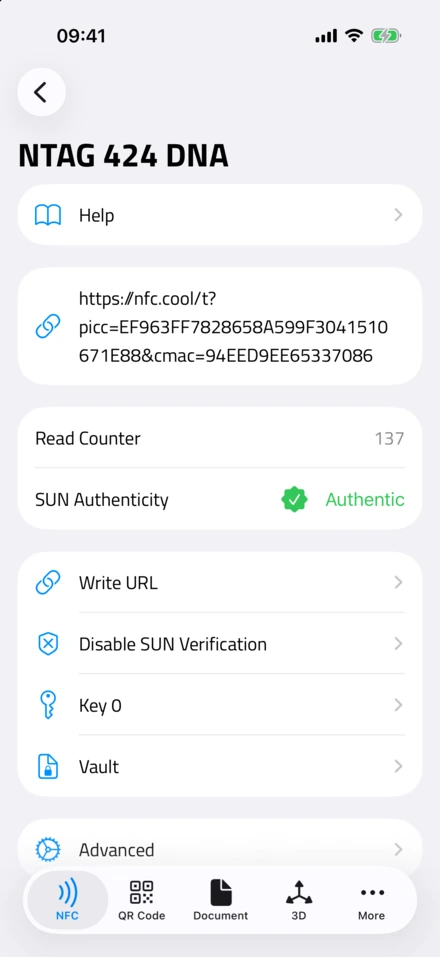
- A genuine tap. The signed link, the read counter, and a passed SUN check.
Hold a tag to your phone and NFC.cool Tools on iPhone or Android does a deep read without asking you for anything: the chip’s identity and whether it’s the TagTamper variant, the link, the settings and access rights of every file, which key slots have been changed from factory, and the results of three separate checks.
Is it genuine NXP silicon?
Every NTAG 424 DNA leaves the factory with an originality signature: an ECDSA signature over the chip’s own seven-byte UID, made with NXP’s private key on the P-224 curve. NFC.cool reads it and verifies it against NXP’s published public key, right on the phone, with no key from you. If it checks out, the app shows “Genuine NXP”. That answers the first question: is this real NXP silicon, or a look-alike chip that merely answers to the same name?
Is this tap authentic?
This is the SUN check. The app takes the picc_data and cmac from the link the tag just served, decrypts the PICC data to get the UID and the read counter, recomputes the CMAC, and compares it with what the tag sent. If the two match, you see “Authentic” and the counter shows up as the Read Counter.
This check needs the tag’s key, because that’s the whole point of it. A tag still on its factory keys verifies with the all-zero key. A tag you’ve locked with your own key verifies with the key NFC.cool stored when you set it. A tag someone else locked with a key you don’t have shows “Not verified”, which is the correct answer.
Has the seal been broken?
One version of these chips, the NTAG 424 DNA TagTamper, is built to be a tamper-evident seal. It’s a sticker with a thin conductive loop running through it. You stick it across whatever you want to protect, over a box’s flap or around a bottle’s cap, the same job those “warranty void if broken” stickers do today. Open the item and you tear the sticker, which breaks the loop.
The chip tracks two things about that loop: a permanent latch that records whether it has ever been opened, and the live state right now. NFC.cool reads both on every tap and reports “Sealed”, “Opened”, or the one that matters most, “Opened, resealed”: someone broke the loop and then carefully closed it again. The latch is one-way, so a re-sealed box reads as opened for the rest of the chip’s life. The crypto proves the chip is genuine. This proves nobody has been into the box.
Programming your own: the short version
Reading is half of it. The other half is that those blank tags from AliExpress are yours to program, and the minimal setup is three steps.
Write your link. A normal NDEF write, the same as on any tag.
Enable SUN. The app writes your link with placeholders and tells the chip to mirror its encrypted UID, tap counter, and signature into those placeholders on every read. From now on each tap produces a unique, signed URL.
Set your own Key 0. This replaces the factory zeros with a key only you know, so nobody else can reconfigure the tag.
For that last step you type a passphrase, not a key. NFC.cool derives the AES key from it by taking the first 16 bytes of the passphrase’s SHA-256 hash, the same way on iPhone and Android, so a tag you provision on one opens with the same passphrase on the other. If you’d rather use a key generated somewhere else, say by your own server, you can paste the 32 hex characters instead.
A lost key means a tag you can never reconfigure again, so the app is careful about where it goes. On iPhone it lands in the Keychain and syncs through iCloud Keychain. On Android it’s encrypted with a hardware-backed key and mirrored into Block Store, so it survives a reinstall or a new phone. The new key is saved before the change is sent, and if the tap is interrupted mid-change, both the old and the new value stay available until the tag confirms which one it holds. A passphrase you set on another device can be entered too, and the app checks it against the tag before saving it.
One thing the app deliberately refuses: writing a plain link to a SUN-enabled tag through the ordinary write screen. The mirror offsets are fixed for the URL they were configured with, and a URL of another length would leave the chip mirroring into the middle of your new content on every tap. The NTAG 424 screen turns SUN off first, then writes.
The rest of the chip
That short version is where most tutorials stop, and until now the way to go further was NXP’s TagXplorer on a desktop with a USB reader. I wanted the whole datasheet reachable from the phone, so I went down it section by section.
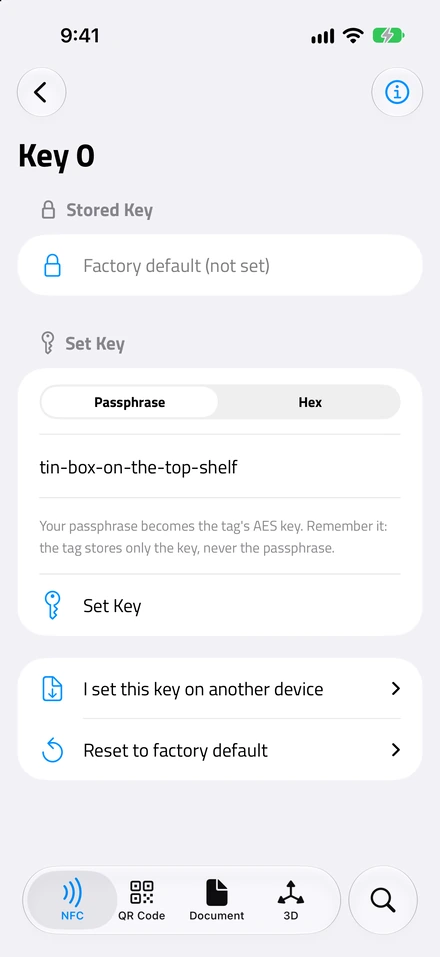
All five keys
Key 0 has its own screen, and Keys 1 to 4 live under Advanced. Each can be set from a passphrase or hex, reset to the factory default, or entered after it was set on another device. Every change authenticates with Key 0, the change authority for all five slots.
SUN, with the keys of your choice
Enabling SUN isn’t a single switch. You choose the mode: encrypted, where the UID travels inside picc_data and only a key holder can read it, or plaintext, where the UID and counter appear in the URL in the clear and only the signature is secret. And you choose which keys do the work: a meta-read key that encrypts the PICC data and a file-read key that computes the signature. They can be the same slot or two different ones, which is how a brand could hand a partner the key that verifies taps without handing over the key that decrypts UIDs.
The app warns you if you pick a slot still on the factory zeros, because a signature made with a known key protects nothing. And the verification side understands the same variety: a tap signed with Key 3 and encrypted with Key 1 verifies correctly as long as those keys are stored on the phone.
File access rights
Every file carries four permissions: Read, Write, Read & Write, and Change, the last one governing who may edit the other three. Each permission points at one of the five keys, at Free (anyone), or at Never (nobody, ever). So you can say “anyone may read File 02, only Key 2 may write it, and only Key 0 may change these rules”, and the chip enforces that with no app in the loop.
NFC.cool shows the current rights of each file and lets you edit them, with two warnings built in. It tells you when a permission points at a key this phone doesn’t hold, because you may be locking yourself out. And it makes you confirm through a separate step before setting Change to Never, because once that’s written the file’s rules are frozen for the life of the chip.
Chip configuration
Below the files sits the chip’s own configuration, which NXP exposes through a single SetConfiguration command. NFC.cool covers these options:
Random UID. Normally the chip reports the same fixed UID to every reader, which lets anyone track a tag across taps. With Random UID on, it answers with a fresh random ID each time and only reveals the real one after you authenticate. A real privacy win, and permanent. The app identifies tags by UID, so it recovers the real one afterward by trying each Key 0 it knows over an authenticated GetCardUID, and the tag stays manageable on the phone that provisioned it.
Failed-authentication limit. How many wrong-key attempts the chip tolerates before it locks Key 0. It’s protection against key guessing, but set it too low and a handful of failed taps can lock the master key for good.
Back modulation strength. Strong or standard. Standard can be unreadable on small antennas, so the default is a sensible place to leave it.
Chained write. Can be disabled so a single write is capped to one frame. Permanent.
Capability bytes. Two free bytes NXP leaves for your own use.
LRP. The secure-messaging switch, which gets its own section below.
The vault
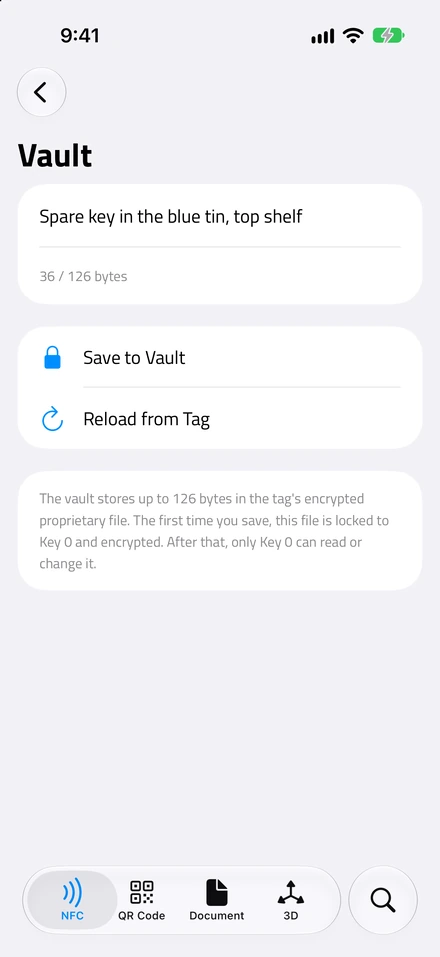
File 03 is a 128-byte proprietary file the chip can keep encrypted, and NFC.cool turns it into a small private store on the tag itself. The first time you save something, the app switches the file to fully encrypted mode and locks every access right to Key 0. After that, the vault holds up to 126 bytes of text that only your key can read back, and a deep read from any other phone gets a permission error and nothing else.
It’s for a secret that should travel with the object rather than sit in someone’s database: a serial number, a note to your future self, a token your own server expects. Resetting Key 0 to factory erases it, which is the one way the vault ever goes away.
LRP mode
Normally the chip protects its keys with ordinary AES, and stealing a key would mean breaking AES itself. But there is a sneakier line of attack. Put the chip on a bench, measure the faint variations in its power draw and electromagnetic emissions while it runs the cipher, and with enough of those traces you can reconstruct the key from the leak alone, without ever touching the math. LRP, the Leakage-Resilient Primitive, is a rebuilt secure channel designed to give that leak nothing to hold onto. NXP documents it in AN12304, and it’s real overkill for a sticker on a wine bottle, which is why most tags never turn it on and most tools never learn to speak it.
In my design notes for the first version, right next to “LRP mode”, I had written “not planned”. It kept nagging at me, so I built it. NFC.cool can flip a tag into LRP mode and, more importantly, still authenticate to it and manage it afterward: keys, file rights, vault, chip configuration, all over the LRP channel instead of AES.
Two things to know before you flip that switch. It’s permanent: once a tag is in LRP mode its AES secure messaging is disabled forever, and any tool that only speaks AES can never talk to it again. And SUN is not available on an LRP tag, so a tag whose job is to sign taps should stay in AES mode.
What can’t be undone
A lot of these commands are permanent, and the app is loud about it in the moment: every irreversible action makes you confirm through a warning that spells out the exact consequence. It’s worth listing them here too.
Enabling LRP.
Enabling Random UID.
Disabling chained write.
Setting a file’s Change permission to Never.
Losing a key. The chip has no factory reset. If Key 0 is gone, so is your ability to reconfigure the tag.
A failed-authentication limit set too low, which can lock Key 0 after a few wrong taps.
Practice on a spare before you touch a tag you care about.
Where anti-counterfeit NFC tags actually get used
Honestly? Most people tapping an NFC tag never need any of this, and that’s fine. A sticker that opens a link is a wonderful, boring, useful thing.
But once you’ve held one of these, the use cases are obvious. A luxury bag can prove it’s genuine. A bottle of wine or whisky can show it was never quietly uncorked and refilled, the tamper seal carrying that half. A box of medicine vouches for both the real drug inside and a seal nobody has broken. Event tickets stop being something you can screenshot and pass around, and a tag by a door proves someone actually stood there rather than replaying a saved link from their sofa. It’s the same authenticity problem the EU Digital Product Passport is circling from the regulation side, solved at the level of the individual object.
I didn’t build this because a thousand users asked for it. I built it because I bought some strange tags off the internet out of curiosity, figured out how they worked, and then couldn’t leave a single page of the datasheet unturned. That’s usually how the good features start.
The bottom line on NTAG 424 DNA tags
NTAG 424 DNA tags are the closest thing NFC has to a tamper-proof seal. They can’t stop someone copying a product, but they make the product’s proof of being genuine impossible to fake, because that proof is a fresh cryptographic signature only the real chip can produce.
NFC.cool Tools reads them, verifies the chip, the tap, and the tamper seal, and hands you the whole chip to configure: every key, every file’s permissions, the chip’s own settings, even LRP, all from your phone. If you’ve ever wondered how a tap can tell real from fake, grab it on iPhone or Android, order a couple of these tags for a few euros, and tap one yourself. It’s a good rabbit hole.