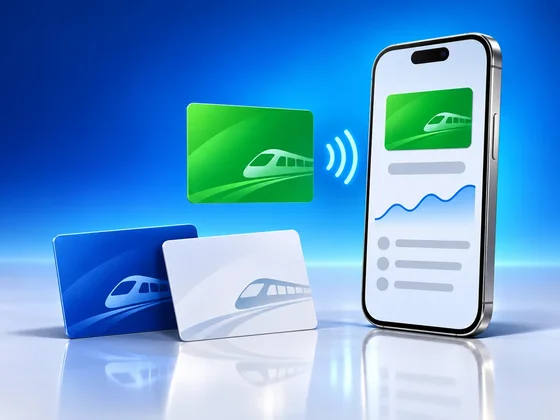
For years, one kind of email kept landing in my inbox, in a dozen languages and with a dozen different card names in it. “Your app doesn’t read my e-money card.” “It can’t see my IC card.” “I held my metro ticket to the phone and nothing happened.”
They had a point. NFC.cool would find the chip, show its ID and chip type, and stop there. To someone holding a card with money on it, that looked like the app had given up. The balance they wanted was right there on the card, after all.
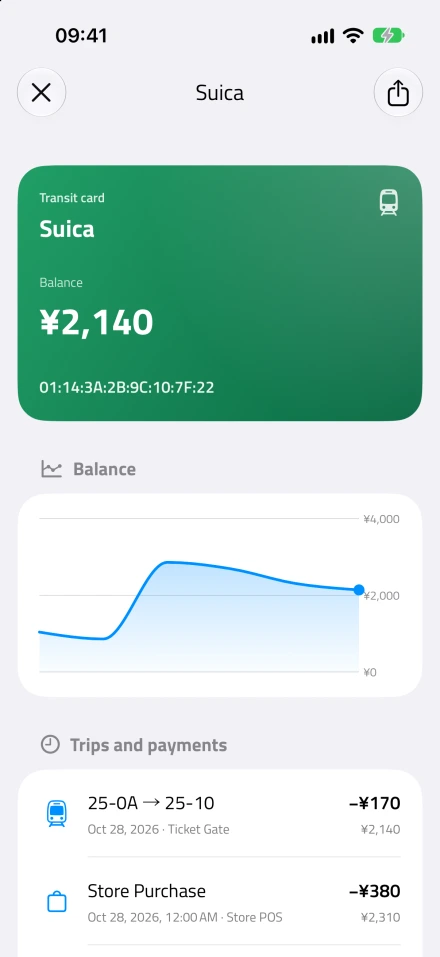
Version 7.4.0 of NFC.cool Tools is my answer to that inbox. Hold a transit card, an e-money card or a bank card to your iPhone, and the app now shows its balance, its recent trips and, just as interesting, everything anyone else could read from it. It starts on iPhone, and NFC.cool Tools for Android (soon) gets the same card reading.
Why “an NFC card” isn’t one thing
Every one of these cards talks to your phone over NFC. That’s where the similarity ends.
The way I think about it: NFC is only the front door. Behind it, every card is its own building, with its own floor plan and its own locked rooms. Japan’s cards run on Sony’s FeliCa. A lot of European transit cards use Calypso. San Francisco, Sydney and Helsinki use MIFARE DESFire, each with a different layout inside. Bank cards speak EMV, the same standard the terminal at your supermarket checkout uses.
And inside each building, the operator decides which rooms are open. Some leave the balance and the last twenty trips where anyone can walk in. Others lock every door, and only their own gates and ticket machines carry the key. No app gets past that, and NFC.cool doesn’t try: every read is read-only, uses no keys and writes nothing to the card.
So the real work behind this feature was learning the floor plan of each card system, one at a time.
Which IC and transit cards NFC.cool can read
Here’s what the app knows how to read today. One honest note first. I tested everything I had in my own wallet, including the disposable paper OV-chipkaart ticket from the Netherlands and my own bank cards. But there are far more cards in the world than in any wallet, so most of the readers below are built on how each card system is laid out, not on a card I held myself. If yours reads wrong, or not at all, I really want to hear about it. More on how below.
Balance and recent trips
Japan: Suica, PASMO, ICOCA, Kitaca, manaca, nimoca, PiTaPa, TOICA and Hayakaken, with up to 20 recent trips and their stations where the app knows them. Rakuten Edy, nanaco and WAON show their balance and history too.
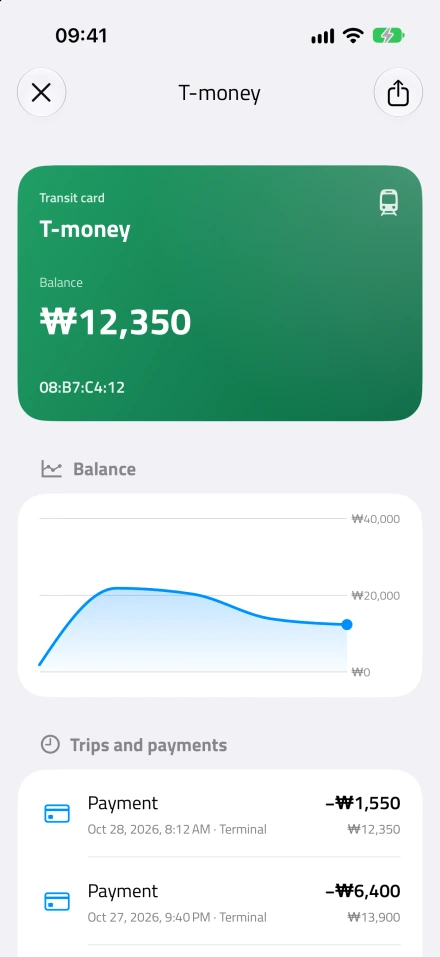
South Korea: T-money and Cashbee, with recent trips and the card’s issue and expiry dates.
China and Hong Kong: Shenzhen Tong, Wuhan Tong, City Union cards (shown as Shanghai Public Transport when it’s a Shanghai card) and T-Union, with recent trips and validity dates. Hong Kong’s Octopus shows its balance.
Indonesia: Mandiri e-money, BCA Flazz, BNI TapCash, MegaCash and the KRL Kartu Multi Trip, with history. JakCard and MRT Jakarta cards show the balance.
Australia and New Zealand: Opal in Sydney, with the balance and the last trip, and Wellington’s Snapper, which runs on the same system as T-money and shows up in NZ$.
USA: Clipper in San Francisco and ORCA in Seattle.
Finland: the HSL, Waltti and Tampere cards.
Israel: Rav-Kav, with its stored value, passes and trips.
Passes and trips, but no balance
Many European cards don’t hold a balance at all. They carry passes. Paris’s Navigo and the other French Calypso cards (Pass Pass, KorriGo, OùRA and more), MOBIB in Brussels, Opus in Montreal, Venezia Unica and Lisboa Viva show the passes on the card and the recent trips. Adelaide’s metroCARD and Abu Dhabi’s Hafilat do the same, because their balance sits behind the operator’s key.
Paper and single-use tickets
The thin paper tickets have a chip too. NFC.cool reads Chicago’s Ventra and Vancouver’s Compass tickets, Moscow’s Troika, Clipper’s paper tickets, the HSL, Tampere, Venice and Pisa tickets, the OV-chipkaart paper ticket, and Turin’s GTT tickets, where you’ll see the ticket type, when it was issued and when it was validated.
Locked by the operator
Some operators lock everything. For London’s Oyster, Dublin’s Leap or Bangkok’s Rabbit card, NFC.cool can tell you which card it is, and that’s it, because nothing else on it is open. A few, like Myki in Melbourne and PRESTO in Toronto, give away the card number and keep the rest. That isn’t something an update can change. It’s how those systems are built.
Cards that need an external reader
Some cards the iPhone simply won’t hand over to an app. Singapore’s EZ-Link and NETS FlashPay and Beijing’s Yikatong are like that. Plug in an external USB NFC reader and NFC.cool reads them, with balance and history. I wrote about how those readers work in the post on reading NFC tags on iPad and Mac.
Bank cards: what you see, and what you never see
Bank cards are where people get nervous, and fair enough.
On an iPhone, NFC.cool shows you the network, Visa or Mastercard, and nothing more. Apple doesn’t let apps like mine read a bank card’s payment data on the iPhone, and as someone who works with this stack every day, I think that’s the right call.
With an external USB reader there’s more: the network, the card number masked down to its first six and last four digits, the expiry date, the issuing country and the currency. What NFC.cool never reads, on any device, is your name, and the security code and PIN aren’t readable at all. I explain why there’s nothing on the chip worth copying in my NFC tag guide.
What a stranger’s phone could read from your card
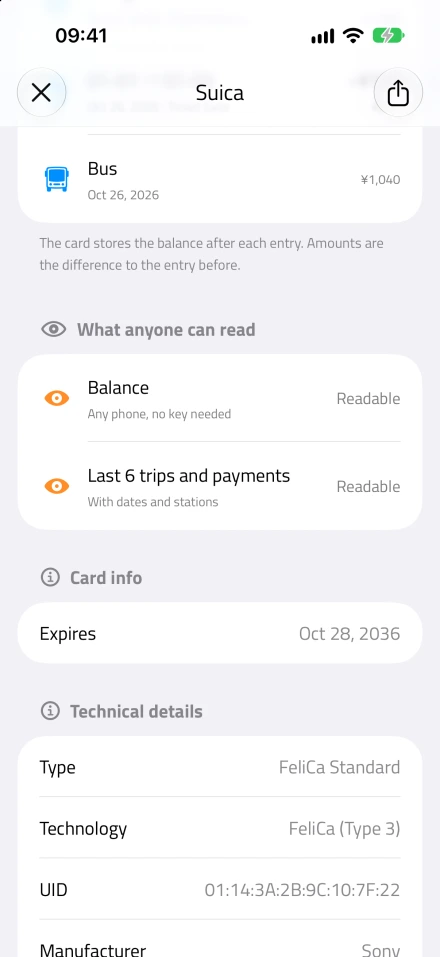
- What anyone can read. On a Suica, the balance and the last trips, with no key needed.
This is the part I find most interesting, and it’s the first thing I’d look at.
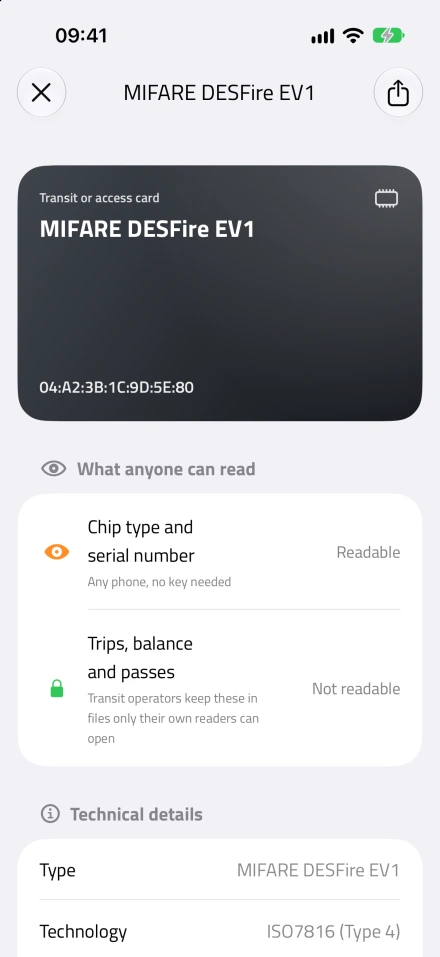
Everything NFC.cool reads, it reads without a key. That means any phone held against your card could read the same thing. A passport is the opposite: its chip stays silent until you give it a key printed on the photo page, which is how reading your passport with your phone works. So every card screen has a section called What anyone can read, listing exactly what this read turned up: the balance, trips with their dates and stations, a card number, whatever the card handed over.
For a Suica, that can be twenty journeys with station names. For a Navigo, your passes and recent trips. For an Oyster, almost nothing. NFC only works over a few centimetres, so nobody is reading your card from across the train, but it’s still worth knowing which kind is in your pocket.
While all of this happens, nothing leaves your iPhone. The read is between the card and your phone, and that’s it.
Your card, over time
Every card you read is saved in your list of scans, with a short summary like “Suica • ¥1,234” so you can find it again. Open it later and you get the card as it was, plus Since last scan, which shows how much the balance changed since the previous time you read that same card. Handy if you’ve ever wondered where the last top-up went.
How to check your card balance on iPhone
Open NFC.cool Tools and tap Read NFC.
Hold the card flat against the top of your iPhone and keep it still until the sheet says Card read.
The card opens on its own screen, with the balance up top and the details below.
You don’t pick a card type first. The app works out what the card is on its own.
Your card isn’t on the list? Send it to me
This is where you come in. When NFC.cool recognises a chip but can’t read all of it, the card screen shows Help us read this card. When it did read a balance and something looks off, the same section is called Something wrong?.
Tap Send read details, type the card’s name and country, and if there’s a balance, tell me whether it’s right. Before anything goes out, tap See the data to look at exactly what will be sent: what the card answered during the read, the chip type, your device and app version, and your country. Your name and any account aren’t part of it, and the card’s serial and any card number the app recognises are masked. A card the app doesn’t know yet could still hold details it can’t spot, which is exactly why you get to look first. If sending doesn’t work, you can email it to me instead.
Every report is a card I don’t have, often from a city I’ve never travelled to, and it’s how the next cards get supported. So if you ever wrote to me that NFC.cool doesn’t read your card: update the app and try it again. And if it still doesn’t, you now have a button that sends me exactly what I need to fix that.